



How to View or Edit Old Updates on LinkedIn in 2016
Sometimes, you may wish to refer back to old posts or comment on them. Unfortunately, LinkedIn do not make this easy, but here’s how:
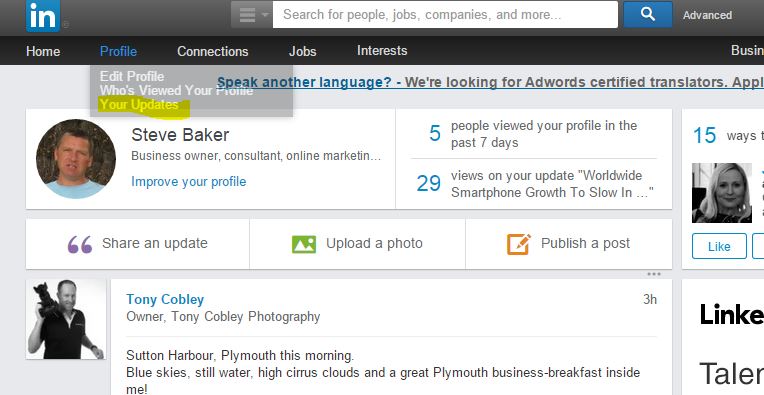
- Go to your LinkedIn home page:
http://www.linkedin.com/nhome/?typeFilter=ALL - Underneath your profile menu
- Select Your Updates as per below
How to Increase Your LinkedIn Engagement by 386%
Whilst LinkedIn isnt as trendy (or fun) as Facebook or Twitter – and doesn’t generate as much traffic or a search engine improvements as Google+, the quality of engagement outstrips the other networks, particularly if you are B2B. Read more …

Verena
| #
Thanks for the explaination. I did everything accordingly, and now waiting for the 24h to pass for it to show up in my Analytics. However, the small one-sentence confirmation is not appearing anymore, when someone fills in the contact form on our website. Could you please give some input on how to fix this?
stevenba
| #
Unfortunately not I’m afraid. It does vary with the type of activity and LinkedIn frequently change their policies, but at present, LinkedIn’s maximum is 30 days.
Regards
Steve
N_jarolmasjed
| #
Hi there.thank you for your website
Is there any possibility to see all my updates in linkedin from the bigining?I had been linkedin member for about 3 years or so and .I had shared simething that I need it now and unfortunately I lose to have them any where else they were gone. I’d have been grateful if you can guide me
Many thanks